

Here’s a quick little script which I wrote to tabulate the word frequencies in Pidgin logs. Simple, you point it towards a contact’s log directory:
$ ./purple-stats.py /home/krkhan/.purple/logs/msn/krkhan\@inspirated.com/some.friend\@some.gmail.com |
And it gives you the words in their descending order of usage:
0: you (38)
1: it (30)
2: to (24)
3: the (22)
4: in (22)
5: lol (22)
6: of (22)
7: so (18)
8: is (18)
9: what (16)
...
As usual, Python was used for the dirty work:
purple-stats.py
1
2
3
4
5
6
7
8
9
10
11
12
13
14
15
16
17
18
19
20
21
22
23
24
25
26
27
28
29
30
31
32
33
34
35
36
37
38
| #!/usr/bin/env python
from operator import itemgetter
from string import punctuation
import locale
import os
import sys
from BeautifulSoup import BeautifulSoup
if __name__ == "__main__":
if len(sys.argv) < 2:
print "usage:", sys.argv[0], "<logs directory>"
dir = sys.argv[1]
contents = filter(lambda x: x[-5:] == '.html', os.listdir(dir))
stats = {}
for entry in contents:
path = os.path.join(dir, entry)
with open(path, 'r') as fd:
data = fd.read()
soup = BeautifulSoup(data,
convertEntities=BeautifulSoup.ALL_ENTITIES)
spans = soup.findAll('span')
for span in spans:
for word in span.text.split():
word = word.strip(punctuation).lower()
if len(word) < 2:
continue
stats[word] = stats.get(word, 0) + 1
sorted_stats = sorted(stats.iteritems(), key=itemgetter(1))
sorted_stats.reverse()
for num, (word, count) in enumerate(sorted_stats):
line = "%10d: %-10s (%d)" % (num, word, count)
line = line.encode(locale.getpreferredencoding())
print line |
Tags:
Beautiful Soup,
Code,
IM,
Logs,
Open Source,
Pidgin,
Python,
Statistics,
Technology
Pidgin is a multi-protocol instant-messaging client which I use for all my MSN/Google Talk/IRC communication. Apart from offering adept support for all of these protocols (and plenty others as well), Pidgin also provides decent logging support. However, I’m not at all interested in having my daily MSN conversations recorded. On the other hand, I prefer having my previous IRC chats with me for reference. Right now, Pidgin does not support any options in the Preferences which would allow me to selectively turn on logging based on the protocols I’m using. If I turn it on for chat windows, it also starts producing logs for every MSN chat I participate in.
Most of the people wouldn’t/don’t see any issue with this behavior. For those who do want to keep a history of their conversations only for particular protocols, here’s a quick workaround for doing it:
- Check the appropriate options under the “Logging” tab in Preferences window.
- Have a few chats the likes of which you’d prefer being logged.
- Go to the directory containing Pidgin logs (default is
~/.purple/logs):
[user@host ~]$ cd ~/.purple/logs/ |
- See whether the protocols you want to be logged have a directory named for them:
irc msn
- Remove the protocols you do not want to have logs for (in my case, MSN):
[user@host logs]$ rm -rf msn |
- Change directory permissions to stop new protocols from getting logged:
[user@host logs]$ chmod 500 . |
And you’re done. Now, whenever you start a conversation in a protocol which does not have a respective directory in ~/.purple/logs, you’ll see a “Logging failed” error message in the conversation window. For other (allowed) protocols, logging will work as expected. To turn off selective logging, reset directory permissions with:
[user@host ~]$ chmod 600 ~/.purple/logs/ |
It is also possible to apply the same workaround on contacts. For example … :
-
[user@host ~]$ cd ~/.purple/logs/msn/
[user@host msn]$ ls |
bestbuddy@live.com ignorantmoron@live.com
-
[user@host msn]$ rm -rf ignorantmoron@live.com |
-
[user@host msn]$ chmod 500 . |
… will disable logging for all MSN contacts including ignorantmoron@live.com, but will record everything communicated with bestbuddy@live.com. Like the previous example, you just have to reset directory permissions to re-enable nondiscriminatory logging:
[user@host ~]$ chmod 600 ~/.purple/logs/msn/ |
Tags:
Google Talk,
IM,
IRC,
Linux,
MSN,
Open Source,
Pidgin,
Technology,
Tutorial,
Windows Live,
Workaround
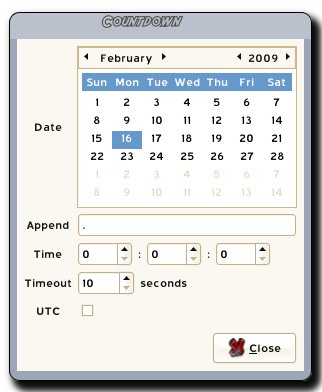
This time though, the 0.2 version bump is pseudo-official, as the experimental branch has finally been merged with the trunk. New features from the revision I just pushed include:
- An “Append” option which, who would’ve expected, appends user-defined text at the end of the countdown.
- An option to select whether the target time is specified in UTC. This was especially problematic as all my sandwiches started taking an extra five hours to heat up in the oven. Initially blaming Pidgin for having some psychic connection with the microwave, it later turned out that the countdown was aiming five hours ahead because, well, that’s the timezone I live in.
Keeping up with the tradition, here’s the obligatory screenshot:

Tags:
AIM,
Code,
Countdown,
GMT,
IM,
Jabber,
Launchpad,
MSN,
Open Source,
Pidgin,
Pidgin Countdown,
Plugin,
Purple,
Status,
Technology,
Time,
UTC
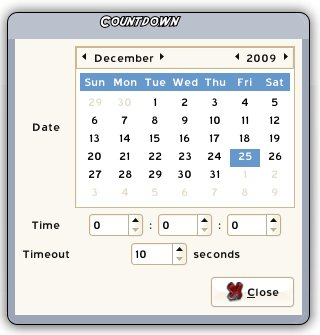
The 0.2 version bump is kinda unofficial as my code branch hasn’t yet been merged into Pidgin Countdown‘s trunk. Nevertheless, here’s the changelog of what I’ve worked on so far:
- Reimplemented preferences with calendar and spin buttons for user-friendliness and validation.

- Fixed plugin unloading.
- Added “activation” of the saved countdown status message.
The plugin has become quite handy now. I do have another set of features planned which I will be implementing as soon as I get some more time for leisure coding. Still, as things stand right now, I am pretty content with being able to countdown my IM status to Roma fixtures, Fedora releases or even my sandwich’s heat-up time in the microwave with just a few clicks.
Tags:
AIM,
Code,
Countdown,
IM,
Jabber,
Launchpad,
MSN,
Open Source,
Pidgin,
Pidgin Countdown,
Plugin,
Purple,
Status,
Technology
No, hitting twenty is not a big deal at all. Also, since I have to deal with an academic fiasco of epic proportions these days, there wouldn’t have been any candles involved even if growing old was halfway as important as not growing up.
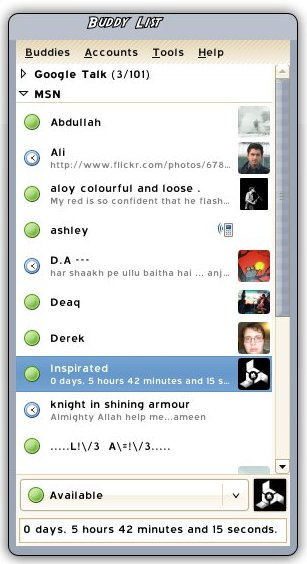
To compensate for the cake though, or lack thereof, I suddenly got this idea of having a countdown for midnight in my MSN status. Fortunately, Stephen English had just started working on a plugin called Pidgin Countdown for achieving such functionality. Less fortunately, the plugin only changed “saved statuses” in Pidgin and didn’t actually activate them for my IM accounts.
Now if this were a Windoze scenario, my only option would have been to pitch up a bug report to the developers and wait for a newer version to pop up (which most certainly would’ve taken considerably longer than six hours — my deadline). On the other hand — the beauty of open-source — all I had to do was to vim the plugin source, consult the Pidgin API documentation for status messages, add a new line and er.. witness the MSN protocol go all schizophrenic as my status message started flipping every second. Increasing the delay to about ten seconds was sufficient to make everything daisy. I actually plan to polish the nifty plugin a little more and have my changes merged in the source repository in near future. Till then:

Tags:
Code,
Countdown,
Open Source,
Pidgin,
Pidgin Countdown,
Plugin,
Purple,
Status,
Technology